
Building marketing automation workflows by hand is a relic of the past.
For the last decade, growth teams spent countless hours configuring "if-this-then-that" rules inside platforms like HubSpot or setting up fragile Zapier pipelines. You had to manually write every email variant, design every ad graphic, and check every API connection.
That era is over.
With the rise of autonomous AI marketing systems, we have shifted from manual rule-building to Agentic Workflows. Instead of managing the pipeline, you set the goal, and cooperative teams of AI agents execute the entire campaign from research to execution.
In this guide, we break down how to leverage AI marketing automation workflows to scale your SaaS or digital agency with zero friction.
Traditional vs. Agentic Marketing Workflows
To understand why this is a paradigm shift, let's compare the legacy approach to the modern autonomous workflow:
| Feature | Traditional Workflows (HubSpot / Zapier) | Agentic AI Workflows (Vect AI) |
|---|---|---|
| Logic Type | Rigid, rule-based branching | Dynamic, goal-oriented decision making |
| Content Creation | Pre-written templates & manual copy | Real-time generated personalized assets |
| Creative Assets | Manual graphic design / Stock photos | AI Image Studio native generations |
| Maintenance | High (links break, APIs change) | Self-healing & autonomous execution |
| Setup Time | Weeks of planning and mapping | Minutes via unified Brand Kernel |
Anatomy of an Autonomous Marketing Workflow
A modern AI workflow does not run in a single vacuum. It coordinates multiple specialized agents that collaborate to achieve a business objective.
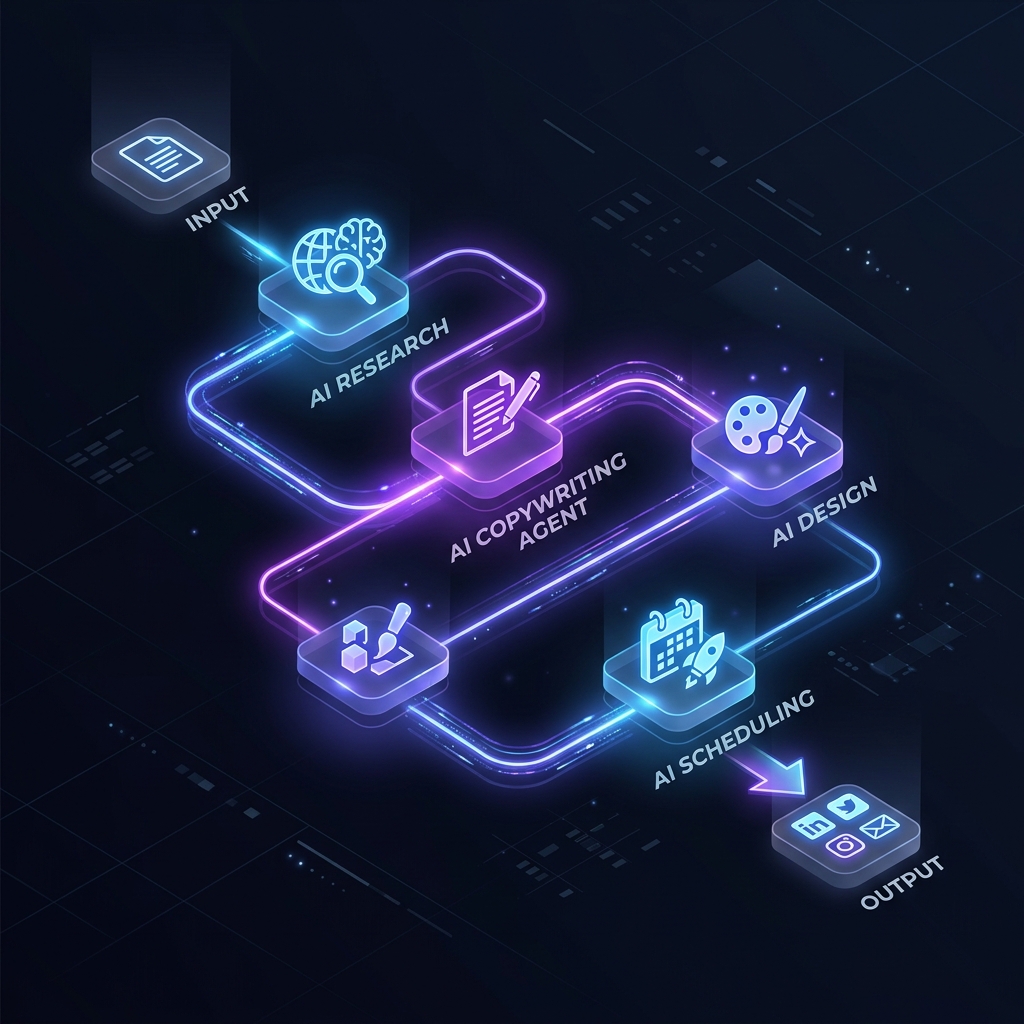
Here is how the automated pipeline flows within Vect AI:
1. The Strategy Agent (Topical Authority)
The workflow starts with the SEO Content Strategist. It scans competitor URLs and searches for high-intent keyword gaps. Once identified, it outlines a semantic content plan.
2. The Creative Agent (Visual & Text Assets)
Once the topics are established, the AI Image Studio generates unique, conversion-optimized visuals while the copywriting agent drafts ad copy, emails, and articles matching your brand voice.
3. The Execution Agent (Distribution)
The Campaign Builder bundles these assets into structured campaigns—pushing blog posts directly to your CMS, launching paid social ads, and queueing outbound email sequences.
3 Steps to Launch Your First Autonomous Campaign
You do not need to write code or map complex flowcharts. Here is how to trigger a high-performing campaign in minutes:
Step 1: Establish Your Brand Kernel
Your Brand Kernel is the central source of truth. Upload your brand guidelines, product value propositions, and customer avatars. Every agent in the workflow will reference this to guarantee voice consistency.
Step 2: Set the Goal in Campaign Builder
Instruct the agent with your target objective:
- Prompt:
"Launch an acquisition campaign targeting SaaS founders for our new analytics tool. Generate 3 blog posts, 2 Facebook ad creatives, and a 4-part cold email nurture sequence."
Step 3: Audit and Deploy
The AI will present the generated assets inside your dashboard. Review the outputs, click Approve, and let the system handle scheduling, delivery, and tracking.
Leverage the Power of Autopilot
Stop wasting engineering resources on marketing pipelines. By switching to AI-driven marketing workflows, you empower your brand to run campaigns 24/7 at a fraction of the cost of legacy software.
Ready to deploy your first autonomous marketing agent fleet?
Stop Reading. Start Scaling.
You have the blueprint. Now you need the engine. Launch the AI agent for "Campaign Builder" and get results in minutes.
Launch Campaign Builder